
BalancePoint Logo - HVAC Load Calculation and Heat Pump Sizing Tool

No guessing. Use real utility data to size heat pumps and HVAC systems with confidence—in a fraction of the time.

BalancePoint analyzes how a home actually uses energy, then turns that data into clear load estimates and heat pump system recommendations you can trust. Because it works from utility data the home has already produced, you get there in minutes instead of hours — no site visit required. Faster sizing, fewer callbacks, happy customers.

✨ Log in and explore instantly with preloaded sample data

Log In to Start Sizing →

Why Choose BalancePoint?

Real Data, No Guesswork

Use actual historic usage to calculate loads, removing the risk of bad assumptions.

Right-Size with Confidence

Compare options, choose equipment that performs well - no over-sizing, no under-sizing.

Simple Clear PDF Reports

Instantly generate clean, visual reports that help explain your recommendations, build customer confidence, and comply with utility programs.

Why Use a Data-Driven HVAC Sizing Tool?

Sizing Grounded in Measured Energy Use

BalancePoint starts from something you can verify: the home's own utility history. It measures how much energy the building actually consumed across a full year of real weather, then derives the heating load from that record. The result is a load figure backed by metered data — and one that is straightforward to explain to a customer.

Because it runs on data the home has already generated, the whole analysis takes minutes instead of hours — no site visit, no room-by-room takeoff, and no window-by-window data entry before you can quote the job.
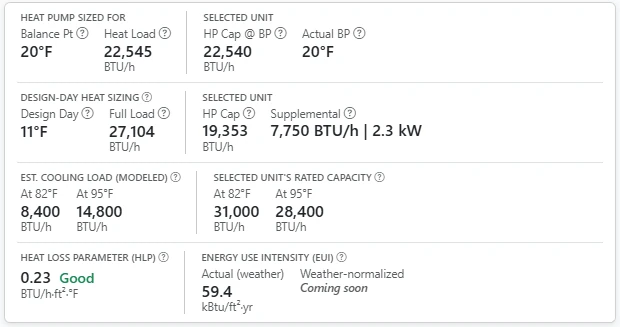
BalancePoint results panel showing the calculated heating load and balance point, design-day sizing with supplemental heat, estimated cooling load, selected unit capacity, heat loss parameter and energy use intensity

Finding the Balance Point

The thermal balance point is the outdoor temperature where a home's heat loss equals the heat pump's capacity. BalancePoint plots your utility data against local weather history to find this exact intersection. That gives HVAC selection a data-backed foundation, showing where a hybrid or full-electric system carries the load on its own and where auxiliary heat takes over.
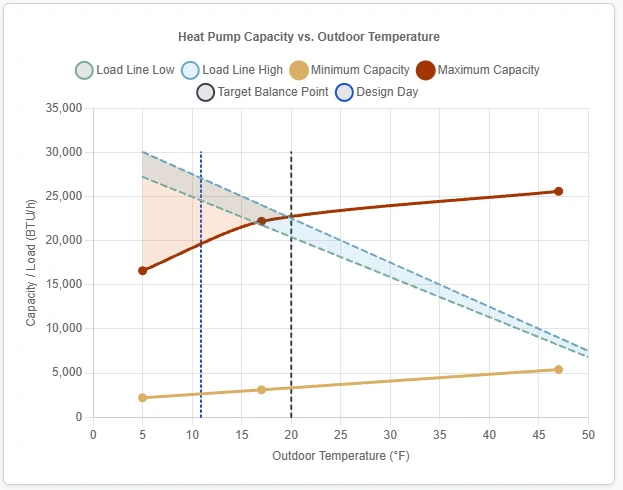
Chart of heat pump capacity versus outdoor temperature, with the measured load line crossing maximum capacity at the balance point and the supplemental heat gap shaded below the design day

Frequently Asked Questions

Yes. The tool is built for heat pump sizing. It overlays manufacturer performance data on the home's measured load curve to show where the balance point falls and exactly how much auxiliary heat the design day calls for.

Metered fuels — electricity and natural gas — come straight from the utility, as a CSV export or a connected account. Delivered fuels are the ones trucked in and stored: heating oil is supported today, entered as monthly delivery bills and measured like any other fuel. Propane and wood are delivered too, but BalancePoint does not take a usage figure for either yet — record them as supplemental heat and the analysis will flag their effect, though a home heated mainly by propane or wood is not a good fit for the tool today. Homes with solar are supported either way: net-metered electric data is corrected back to true household consumption.

Minutes. BalancePoint works from utility data the home has already generated, so there is no site visit and no room-by-room takeoff to complete first. Upload a year of bills or connect the utility account directly, and the load, the balance point and a ranked equipment list all come back in a single pass — hours faster than assembling the same picture by hand.